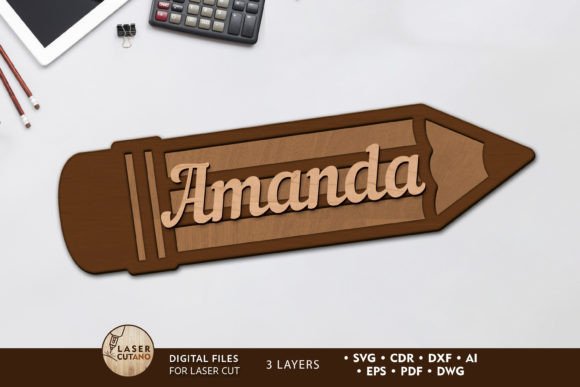
Decor Pencil Layered Laser Cut Template
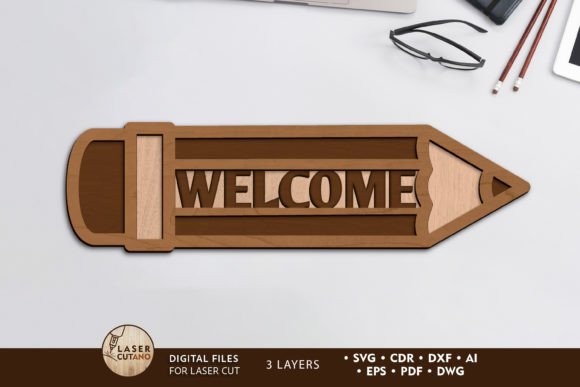
Imagine bringing a classic schoolroom icon to life with stunning depth and texture, ready for your next creative project. The Decor Pencil Layered Laser Cut Template offers precisely that—a beautifully detailed, multi-layered design that transforms a simple pencil into a sophisticated piece of decor or signage. This digital layout file is your key to creating eye-catching physical items with a professional finish.
This isn't just a simple outline. The template is a carefully crafted, multi-layered design intended for cutting machines like laser cutters, CNC routers, and popular models such as Glowforge and Xtool. Each layer is designed to be cut from 3mm thick materials like plywood, MDF, acrylic, or plexiglass, then assembled to create a striking 3D effect. The final assembled piece measures a versatile 3 by 6 inches, perfect for a desk ornament, a wall hanging, or a decorative element in a larger installation.
Creative Applications and Design Flexibility
The beauty of this Decor Pencil Layered Laser Cut Template lies in its versatility. It’s more than a single-use file; it’s a design asset that can be adapted for numerous projects. Consider these practical use cases:
- Educational Decor: Create unique awards, classroom signs, or motivational pieces for schools and learning centers.
- Brand Identity: Use it as a distinctive element for businesses related to education, writing, stationery, or creative services, adding a tactile, artisanal quality to your brand.
- Event Decor: Design custom centerpieces, table numbers, or photo booth props for teacher appreciation events, book launches, or graduation parties.
- Home and Office Accents: Craft personalized gifts for writers, students, or teachers, or simply add a whimsical yet polished touch to your own bookshelf or office wall.
While the design is optimized for 3mm material, you have the flexibility to scale it up for a more impactful statement piece. However, if you choose to reduce the size, it’s important to be mindful of the thinner, intricate elements that ensure clean cuts.
Tips for a Polished Final Product
Achieving a professional result is straightforward with a few simple tips. The process begins with your material choice. Plywood offers a classic, warm aesthetic, while acrylic can provide a modern, colorful, or even transparent look. Before assembly, take the time to paint or finish each individual layer. This step is crucial for adding color contrast and depth, making the final, glued product visually striking. Planning your color scheme in advance—whether it’s a realistic yellow No. 2 pencil or a vibrant, abstract palette—will elevate the finished piece from a craft project to a piece of decor.
Think of this template as a foundational design asset. Just as you would carefully select a premium font for a logo or a poster design to set the right tone, choosing a well-made physical template ensures the quality and visual appeal of your tangible creations. The precision of the laser-cut lines and the thoughtful layering are what give the final product its professional polish, much like how modern typography can define a brand's identity.
This digital download provides exceptional value, giving you immediate access to the design in a wide array of formats (.AI, .SVG, .DXF, .DWG, .CDR, .EPS, .PDF). This ensures compatibility with virtually any design software and cutting machine you use, making it a flexible addition to your library of design assets. By starting with a high-quality template, you streamline your workflow and ensure a consistent, impressive outcome every time. It’s a simple way to add a unique, handcrafted feel to your projects, blending the charm of a classic pencil with the precision of modern digital fabrication.